Proxy Traps Deep Dive
How CtroEnv's Proxy protects secret values from accidental exposure.
Proxy Traps Deep Dive
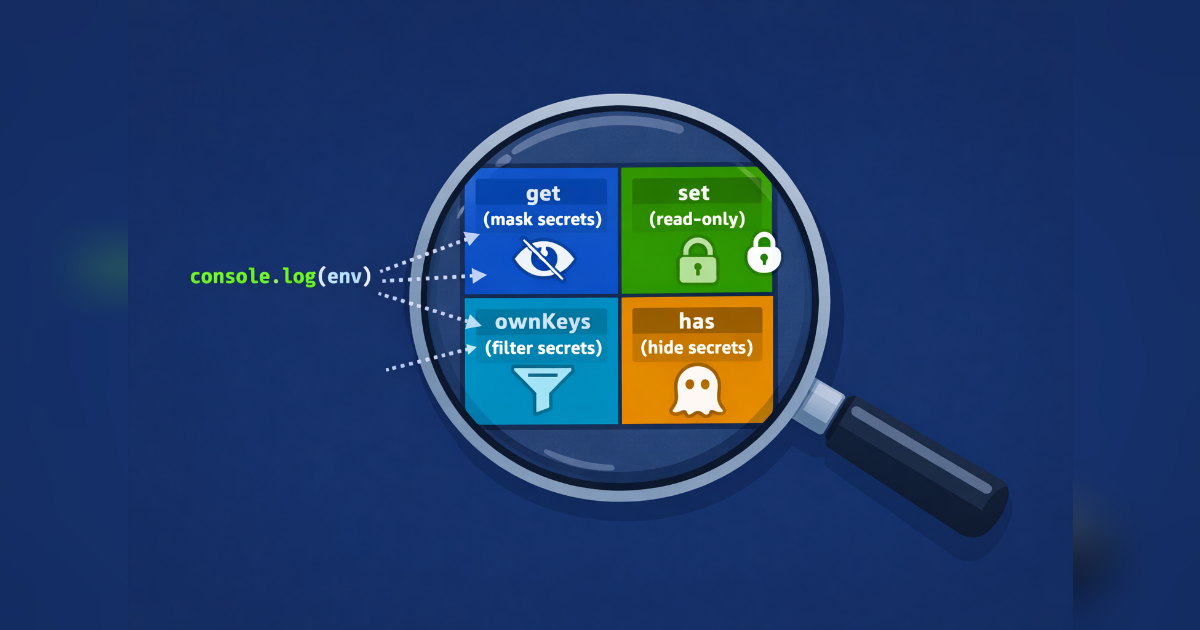
When you mark a variable with .secret(), CtroEnv wraps the result in a Proxy that intercepts every way a value can leak. Here's how each trap works.
The Four Proxy Traps
The Proxy in defineEnv() intercepts four operations:
get
The read trap returns the mask string for secret keys, the real value for everything else:
env.JWT_SECRET          // "********" — masked
env.DATABASE_URL        // "postgresql://..." — real value
env.meta                // EnvMeta object — special key
It also handles Symbol.for("nodejs.util.inspect.custom") for console.log():
console.log(env)
// { JWT_SECRET: '********', PORT: 3000, meta: [Object] }
getOwnPropertyDescriptor
Without this trap, Object.getOwnPropertyDescriptor() would leak the real value:
Object.getOwnPropertyDescriptor(env, "JWT_SECRET")
// { value: "********", writable: false, enumerable: true, configurable: true }
ownKeys
The ownKeys trap ensures meta appears in key listings:
Object.keys(env)          // ["JWT_SECRET", "PORT", ...]
// meta is NOT in keys (it's non-enumerable)

Reflect.ownKeys(env)      // ["JWT_SECRET", "PORT", "meta", ...]
// meta IS in ownKeys
has
Makes "meta" in env return true:
"meta" in env             // true
"JWT_SECRET" in env       // true
Preventing Mutation
The Proxy also blocks writes and deletes:
env.JWT_SECRET = "new-value"
// TypeError: Cannot assign to read-only property

delete env.JWT_SECRET
// TypeError: Cannot delete property of frozen object
Accessing Raw Values
The meta object bypasses all masking traps:
env.meta.get("JWT_SECRET")  // actual value
env.meta.has("JWT_SECRET")  // true
env.meta.keys()             // ["JWT_SECRET", "PORT"]
env.meta.toJSON()           // { JWT_SECRET: "actual-value", PORT: 3000 }
meta is non-enumerable — it won't appear in Object.keys(), for...in, or JSON.stringify().
Serialization
JSON.stringify(env)
// {"JWT_SECRET":"********","PORT":3000}
Secrets are masked. The meta object is excluded (non-enumerable). For complete unmasked output, use env.meta.toJSON().
The structuredClone Limitation
structuredClone(env) throws a DataCloneError. This is a V8 limitation on Proxy objects — the runtime refuses to clone proxied objects. Workaround:
const cloned = JSON.parse(JSON.stringify(env))What the Proxy Does NOT Protect
- Module scope: If you destructure
const { JWT_SECRET } = env.meta.toJSON(), the raw value exists in your module scope. Standard JavaScript scoping rules apply. - Logging the meta object:
console.log(env.meta)logs the actual values. Use the proxy'd env object for general logging. - Error originalValue: The
originalValuefield on validation errors is not populated bydefineEnv(). It exists for direct use witherrInvalid()anderrType()in custom validators.
Custom Mask String
Override the default "********" with maskWith:
const env = defineEnv(schema, { maskWith: "***" })
env.JWT_SECRET  // "***"
Best Practices
- Use
meta.get()deliberately, not as a default access pattern - Log
env, notenv.meta— the proxy handles masking for you - Don't assign
env.metato a module-level variable - Consider using a fixed-length mask if the default length reveals information about secret values