Node.js Adapter Deep Dive
How loadEnv() parses .env files, handles interpolation, and integrates with process.env.
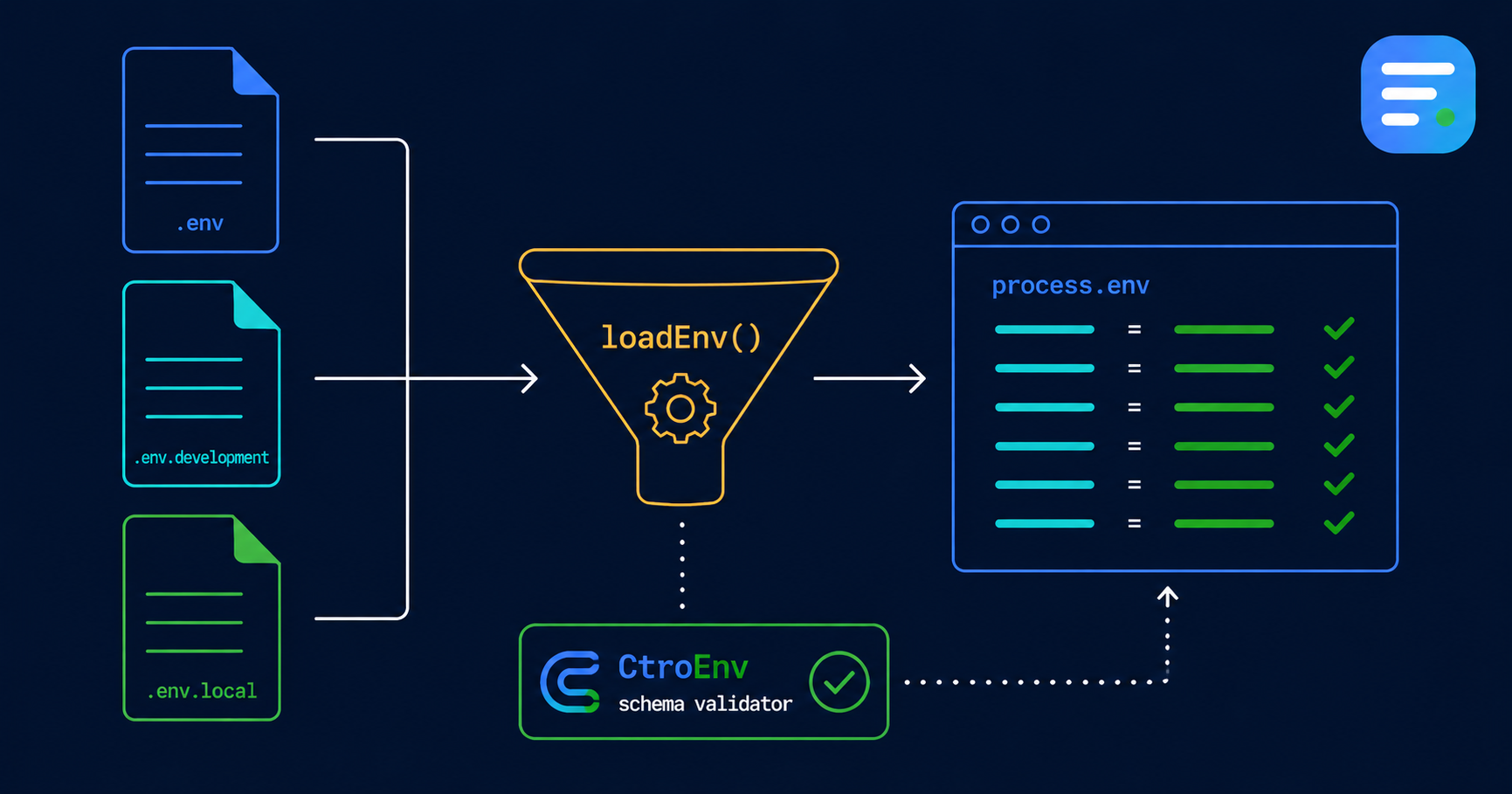
Node.js Adapter Deep Dive
The @ctroenv/node adapter bridges CtroEnv's validation with Node.js's process.env and .env file loading. Here's how it works and how to configure it.
Loading .env Files
loadEnv() reads environment files with the same priority as dotenv:
import { defineEnv } from "@ctroenv/core"
import { loadEnv } from "@ctroenv/node"

const env = defineEnv(schema, { source: loadEnv() })
File resolution order:
.env— base defaults.env.{NODE_ENV}— environment-specific (.env.development,.env.production).env.local— local overrides (gitignored)
Later files override earlier ones. process.env values take precedence unless override: true is set.
Custom Parser
The built-in parser handles edge cases that raw fs.readFileSync + split("\n") misses:
# Comments — lines starting with #
# DATABASE_URL=not-used

# Quoted values — preserves spaces and special chars
APP_NAME="My App"

# Multiline values — backslash continuation
MULTI_LINE="This is a \
long value"

# Interpolation — references other variables
DATABASE_URL="postgres://${DB_USER}:${DB_PASS}@localhost:5432/db"
DB_USER=admin

# export prefix
export JWT_SECRET=my-secret

# Inline comments
VALUE=hello # this is a comment

# Dollar sign escaping
PRICE=$$100  # becomes $100
Parser Options
interface LoadEnvOptions {
  path?: string        // directory to search (default: process.cwd())
  encoding?: string    // file encoding (default: "utf-8")
  override?: boolean   // file values override process.env (default: false)
  system?: boolean     // fall back to process.env if key not in file
  native?: boolean     // use Node.js 22+ process.loadEnvFile() if available
}
path — Monorepo Support
For monorepos where the schema lives in a sub-package but the .env file is at the root:
const env = defineEnv(schema, {
  source: loadEnv({ path: "../.." }),
})
native — Node 22+
Node 22 introduced process.loadEnvFile(). When native: true is set and the runtime supports it, CtroEnv delegates to the native implementation:
const env = defineEnv(schema, {
  source: loadEnv({ native: true }),
})
If process.loadEnvFile doesn't exist (older Node versions), it falls back to the custom parser.
system — System Environment Fallback
By default, loadEnv() returns values from .env files only. With system: true, it falls back to process.env when a key isn't in the file:
const env = defineEnv(schema, {
  source: loadEnv({ system: true }),
})
override — File Priority
By default, process.env takes precedence over file values. Set override: true to let files override environment variables already set in the process:
const env = defineEnv(schema, {
  source: loadEnv({ override: true }),
})
nodeSource()
For projects that just want process.env without any file loading:
import { defineEnv } from "@ctroenv/core"
import { nodeSource } from "@ctroenv/node"

const env = defineEnv(schema, { source: nodeSource() })
This is a thin wrapper around process.env[key].
parseEnvFile()
Use the parser standalone for custom loading strategies:
import { parseEnvFile } from "@ctroenv/node"
import { readFileSync } from "node:fs"

const content = readFileSync(".env.custom", "utf-8")
const vars = parseEnvFile(content)
// { DATABASE_URL: "postgres://...", PORT: "3000" }
Returns a Record<string, string> with all variables parsed and interpolated.
Migration from dotenv
// Before
import "dotenv/config"
const dbUrl = process.env.DATABASE_URL

// After
import { defineEnv } from "@ctroenv/core"
import { loadEnv } from "@ctroenv/node"

const env = defineEnv(schema, { source: loadEnv() })
env.DATABASE_URL  // typed, validated, guaranteed present
The main differences: CtroEnv validates types, applies defaults, and provides typed access. dotenv only loads files.